From Purchase to Pay: How Quarto ERP Purchasing Connects Procurement, Inventory and Finance
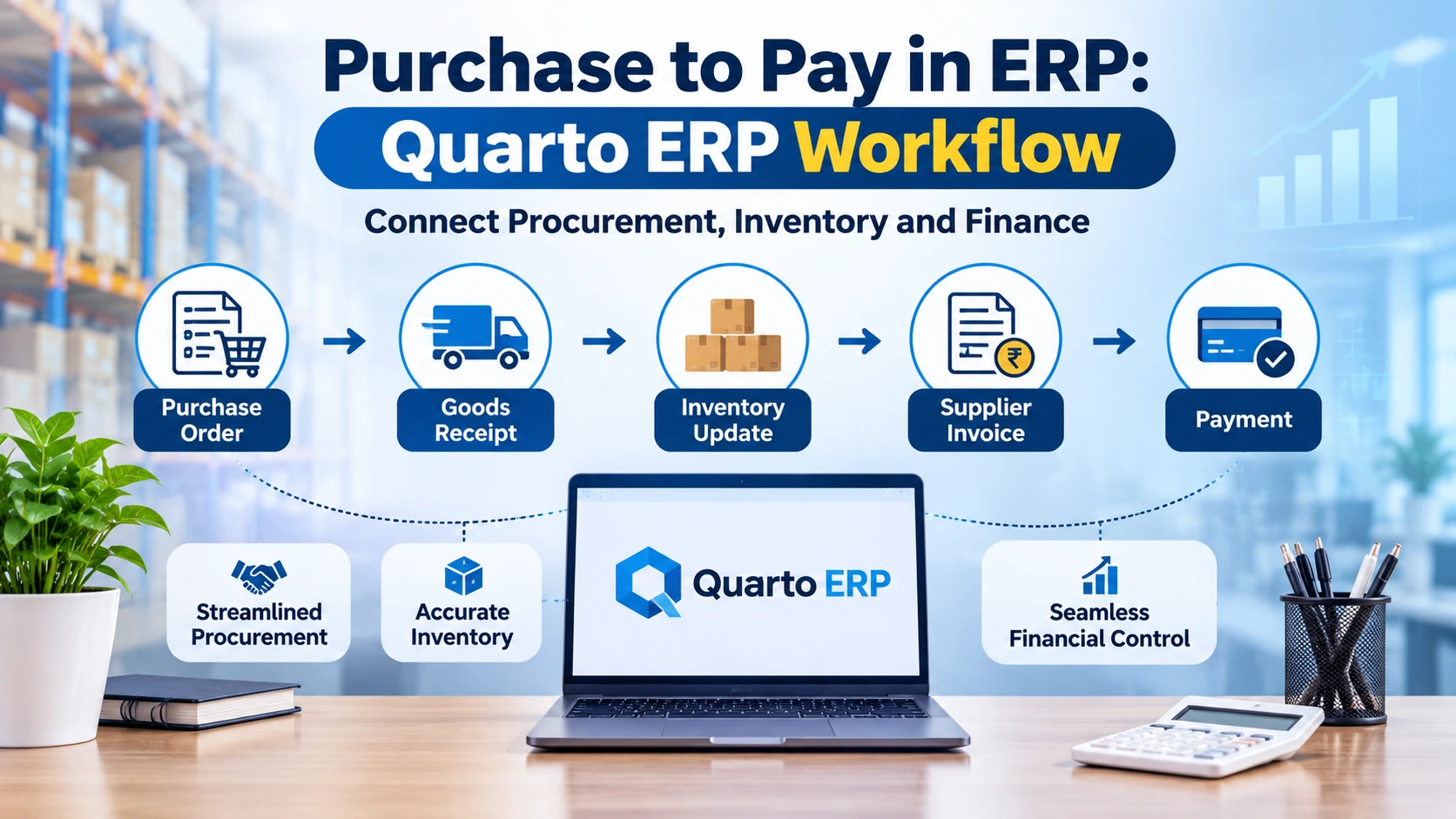
ERP purchasing is the part of an ERP system that handles buying, from the first request for stock to the final supplier payment. It records every step in the same database that your stores and accounts teams use. In Quarto ERP, the purchase order, the goods receipt, the supplier invoice and the payment are linked documents. Stock quantities, item costs, tax and payables update as the work happens, so nobody re-enters them later.
This guide follows one purchase through that chain. It shows what changes in inventory and in the books at each step, and what GST and VAT add for businesses in India and the Gulf.
What ERP purchasing covers, and how it differs from procurement
The two words are often used as if they mean the same thing. They overlap, but they are not identical.
- Purchasing is the transaction: raise an order, receive the goods, book the invoice, pay the supplier.
- Procurement is wider. It adds deciding what to buy, choosing suppliers, negotiating terms and managing contracts.
- Purchase to pay, also called procure to pay or P2P, names the whole chain from request to payment.
A purchasing management ERP module covers the transactions and the supplier records behind them. Its main value is that it shares data with inventory and finance.
Where disconnected purchasing breaks down
Many growing businesses buy through a mix of phone calls, spreadsheets and an accounting package. That works until volume grows. Then the same problems appear:
- Stock on the system does not match stock on the shelf, because receipts are entered days late.
- A supplier invoice is paid in full although part of the order never arrived.
- Item cost ignores freight and handling, so margins look better than they are.
- At month end, nobody knows the value of goods received but not yet invoiced.
- Tax credit is claimed on an invoice that does not match what was received.
Each problem has the same cause. Purchasing, stores and accounts keep separate records of one event.
The purchase-to-pay flow in Quarto ERP, step by step
The features named below are listed on the Quarto ERP page.
1. Supplier master
Everything starts with a clean vendor profile. Quarto ERP holds the supplier master with credit period and credit limit, delivery duration, the list of items each supplier provides, and pricing, margin and offer details. A buyer raising an order sees agreed terms instead of searching old emails.
2. Purchase indent and purchase order
A purchase indent is the internal request to buy. In Quarto ERP, purchase orders can be generated from an indent, from reorder levels, or against a production requisition. Buying is therefore driven by actual stock position and planned production. Pending and undelivered order reports show what is still due, and orders can be cancelled when plans change.
3. Goods receipt
When the delivery arrives, the stores team records a goods receipt against the purchase order. Quarto ERP supports inward item validation, a quality check with approval or rejection, batch number generation, barcode label printing and stock allocation to a warehouse. This is the moment stock becomes available in the system.
4. Landed cost and inventory pricing
The supplier's price is rarely the full cost. Freight, loading and duty all add to it. Quarto ERP includes landing cost calculation and pricing for inventory, so those charges are spread across the items received.
An illustration: you buy 100 units at ₹500 each and pay ₹4,000 in freight and loading. The landed cost is ₹540 a unit, not ₹500. If you sell at ₹600, your margin is ₹60 a unit, not ₹100.
5. Purchase invoice and accounting entry
When the supplier's invoice arrives, it is booked against the goods receipt. The Quarto ERP purchase accounts entry covers GST accounting, other charges and the GRN control reverse entry. The next section explains that entry.
6. Supplier payment
Payments are settled bill to bill, so each payment clears a specific invoice. An age-wise payables report shows what is due now and what is overdue.
7. Returns and debit notes
Rejected or excess goods go back through a purchase return raised against the purchase or goods receipt note. The debit note reduces both the stock and the amount owed to the supplier.
One purchase, three departments: what updates at each step
This table shows why connected ERP purchasing matters. The postings are typical for an ERP that uses a GRN control account. Your own chart of accounts decides the exact ledgers.
| Step |
Purchasing |
Inventory |
Finance |
| Purchase order |
Open order with expected delivery date |
No stock change; quantity shows as on order |
No ledger entry; a commitment only |
| Goods receipt |
Order marked fully or partly received |
Stock increases in the chosen warehouse, by batch |
Inventory debited, GRN control account credited |
| Landed cost |
Extra charges linked to the receipt |
Item cost rises to include freight and other charges |
Other charges accounted |
| Purchase invoice |
Order marked as billed |
No quantity change |
GRN control reversed, input tax recorded, supplier credited |
| Payment |
Supplier balance updated |
No change |
Supplier debited, bank credited |
| Purchase return |
Debit note issued |
Stock decreases |
Payable and input tax reduced |
Why the GRN control account matters
Goods and invoices rarely arrive together. Suppose goods worth ₹2,00,000 arrive on 28 March and the invoice arrives on 4 April. Your stock went up in March. Without an entry, your March liabilities are understated by the same amount.
A GRN control account solves this. It works in three moves:
- On goods receipt, inventory is debited ₹2,00,000 and the GRN control account is credited ₹2,00,000.
- On invoice, with GST at 18%, the GRN control account is debited ₹2,00,000, input GST is debited ₹36,000 and the supplier is credited ₹2,36,000.
- On payment, the supplier is debited ₹2,36,000 and the bank is credited.
At any date, the balance on the GRN control account is the value of goods received but not yet invoiced. It also supports three-way matching: the order, the receipt and the invoice must agree before the entry clears.
GST, VAT and purchasing: what the tax side adds
In India and the Gulf, purchasing records are also tax records.
India. Input tax credit depends on conditions in Section 16 of the CGST Act. These include holding a valid tax invoice, the supplier's invoice appearing in your GSTR-2B, and paying the supplier within 180 days of the invoice date. If payment is late, the credit must be reversed (Tally Solutions guide to Section 16). Receipt dates, invoice matches and payment dates in your purchasing system are therefore evidence for your credit claim. Quarto ERP includes GST accounting on purchase entries and purchase GST registers.
UAE. Structured e-invoicing is being phased in. It becomes mandatory on 1 January 2027 for businesses with revenue of AED 50 million or more, and on 1 July 2027 for those below that level (e-invoicing.org UAE tracker
). The mandate covers receiving invoices as well as issuing them, so it reaches your purchasing process.
Saudi Arabia. The tax authority, ZATCA, runs its own e-invoicing programme with its own technical rules.
Quarto ERP is offered with GST support for India and VAT support for Gulf markets. Tax rules change often, so confirm current requirements with your tax adviser before you configure any system.
Reports that purchasing and finance teams use
Once every document is linked, reporting needs no extra work. Quarto ERP lists these purchase reports:
- Purchase GST registers
- Purchase summary reports
- Purchase orders by item, supplier or group
- Pending orders by item, supplier or brand
- Payables by age
A pending order report tells stores what to expect this week. An age-wise payables report tells finance how much cash is needed.
Is ERP purchasing enough, or do you need procurement management ERP software plus a separate tool?
For most small and medium businesses, the purchasing module inside the ERP is enough. Most of what they buy is stock or raw material, and those purchases must reach inventory and the ledger without delay. That link is exactly what an ERP provides.
Standalone procurement suites add deeper features: sourcing events, contract lifecycle management and supplier portals. They suit larger organisations with heavy indirect spend and a dedicated procurement team. If you buy mainly to stock and sell, or to produce, start with the ERP.
A checklist before you switch on purchasing in an ERP
- Clean the supplier master: legal name, GSTIN or tax registration number, payment terms.
- Complete the item master: units, HSN codes, reorder levels.
- Agree who can approve orders, and up to what value.
- List open purchase orders and goods received but not invoiced, for opening balances.
- Define warehouses and batch rules.
- Decide who performs the quality check on receipt.
- Train stores staff to record receipts on the day goods arrive.
The last point matters most. An ERP reflects reality only if receipts are entered when they happen.
How Codea Technologies can help
Codea Technologies has more than 14 years in software engineering, with over 500 clients and 600 delivered projects. The company is ISO 27001 certified and a NASSCOM member. Quarto ERP runs on the web, on Windows desktop and on Android, so buyers, stores staff and accountants work on the same data.
To see the purchase-to-pay flow with your own items and suppliers, explore Quarto ERP
and ask for a walkthrough.
Frequently Asked Questions
1. What is ERP purchasing?
ERP purchasing is the module of an ERP system that manages buying, from purchase request and purchase order to goods receipt, supplier invoice and payment. It shares one database with inventory and accounts, so each step updates stock and the ledger.
2. What is the difference between purchasing and procurement in an ERP?
Purchasing covers the transactions: orders, receipts, invoices and payments. Procurement is wider and includes supplier selection, negotiation and contracts. Most ERP purchasing modules handle the transactions and core supplier records.
3. What is a GRN control account?
Think of it as a holding account. When goods reach your store but the supplier’s bill hasn’t come in yet, their value sits here until the invoice is entered. Check the balance on any day and you’ll see exactly how much stock you’ve received but haven’t been billed for. That’s what keeps your month-end liabilities honest.
4. How does ERP purchasing update inventory?
Stock goes up at goods receipt, when your stores team records the delivery against the purchase order. Raising the order doesn’t change stock, and neither does the invoice arriving. After that, landed cost adds freight, loading and similar charges to the item’s cost, so you know what each unit really cost you.
5. Does a small business need separate procurement software?
In most cases, no. If you mainly buy stock or raw material, the purchasing module in your ERP will do the job. Standalone procurement tools make more sense for bigger companies that spend heavily on indirect items and run formal sourcing.
6. How does purchasing affect GST input tax credit?
To claim input tax credit, you need a valid tax invoice, that invoice has to show up in your GSTR-2B, and you must pay the supplier within 180 days. When your ERP holds clean records of what was received, billed and paid, backing up the claim gets much easier. Still, check the finer points with your tax adviser.