Perspective

Software Outsourcing Codea operates at the intersection of energy, excellence, and invention.

Read more

CSR Initiatives

We set ambitious goals and make strategic investments to drive improvements...

Read more

Diversity

Codea is committed to creating a diverse and inclusive workforce. There´s growing...

Read more

Innovation

The Spark Innovation Ecosystem ‘Applies Next´ beyond what is developed in house...

Read more

Cyber Security Solutions

Codea delivers advanced cybersecurity solutions and consulting services to enterprises, data centers, and networks through a team of skilled security experts.

Read more
DevOps

VAPT,SIEM & SOC Services

Artificial Intelligence

Our AI services & solutions help gain high-quality and high-accuracy AI capabilities.

Read more
Data Science Consulting Service

Data Science Consulting

Robotic Process Automation

Robotic Process Automation

Staff Augmentation

Codea has already helped 200+ clients augment their teams via hiring dedicated developers. Keep reading to find out what staff augmentation means, what are its benefits, and how to get the most out of augmenting your team with software developers.

Learn More  

Our Industries

Discover how Codea´s breakthrough technologies are transforming industries with smarter ways to do business, new growth opportunities and strategies to compete and win.

Freight & Logistics

ERP For Container Freight Stations
Codea FR8 offers an accurate freight and warehouse management system with built-in redundancies.

Read more

Codea PMIS

Port Management information system
Ports across the globe that have manual and outdated systems and slow paper-based processes are at clear disadvantage in the modern, knowledge-driven world.

Read more
CODEA QUARTO

A complete ERP solution for Manufacturing, Distributing and Service companies.

Read more
CODEA TREAT

An integrated cloud based plug and play to reduce the manual work in an OPD of hospitals/clinics.

Read more
COFIS

A Codea fintech software suite with Core Banking, Insurance, eWallet solutions and Audit management system.

Read more

A FEW CLIENTS WE HAVE HAD THE PRIVILEGE OF WORKING WITH

A multinational company in hospitality industry approached codea to build the following software solution as part of their digitization initiatives.

Contract Catering Management Solution

The client requires a Cloud Solution to manage the Contract catering services offered to various clients. The application requires a Material Management System to suit its business requirements. The client has several catering units across the globe. The client wants to control their material costs and this should be controllable from their corporate office. The web applications mainly focus on the Purchase ordering Process, Inventory Management and Consumption Management. The CCMS Application will take care of the Revenue, Planning and MIS modules in a customized manner.

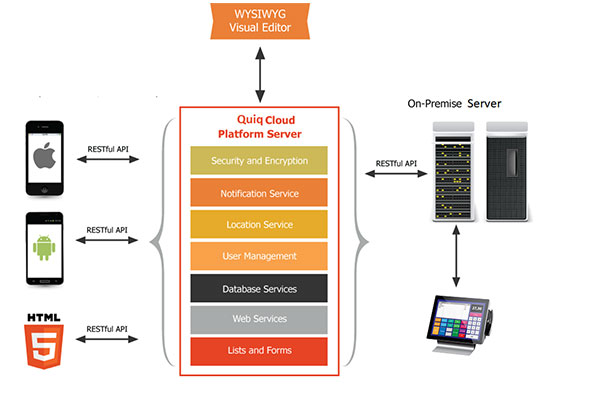
SOLUTION ARCHITECTURE

Dashboard Date wise (User can change the date). Double Click on Receipt, Issue, Wastage, Stock Transfer and Adjustment to open the document. Opening stock and Closing stock are calculated automatically.
Store Keeper will enter the Indent according to the Kitchen raw material requirements. Location, Point of Sales, Doc Alias and Document Date will be loaded automatically in this entry form. User can select the Transaction Date in the date calendar. But he can’t scroll back the calendar not more than a day. Only Administrator User can have the permission to enter/allow the transactions if it is more than one day old. Editing of this entry will be allowed only within 48 hours after the document is saved. The storekeeper will not be able to make the new Indent entry if any previous consumption entry is pending for approval.

Purchase order Entry is a legally binding document between a supplier and a buyer. It details the items the buyer agrees to purchase at a certain price point. It also outlines the delivery date, Shipment details and terms of payment for the buyer.

The solution should give an option to convert the indents to Purchase order entries. Location, Point of Sales, Doc Alias and Document Date will be loaded automatically in this entry form. User can select the Transaction Date in the date calendar. But he can´t scroll back the calendar not more than a day. Only Administrator User can have the permission to enter/allow the transactions if it is more than one-day-old Multiple Vendors can be selected in this form to record the entire receipts happened in a day. Editing of this entry will be allowed only within 48 hours after the document is saved first. Cost and Amount will be calculated automatically in as per rate card selected in “Vendor item Contract”.( Vendor Item Contract). Purchase Order entries will be having the Document Approval Tracking. Customer can assign multiple users/Departments to approve a Document. In Purchase Order, Browser customer can call the documents by the status of the document. If the document is not approved it will not go to the next stage and will be treated as a rejected document. Approval request can be sent through the mail. Authorized users can approve the document via email. No need to enter the application for doing the same. Once the Document is approved Quiq Erp sends the Purchase Order to the Supplier as a Mail.

Goods Receipt Note acts as internal proof of goods received to process and match against the supplier invoices/purchase orders. The goods receipt note is an internal document produced after inspecting the delivery for proof of order receipt.

All the materials received in a day will be entered as a single document in Quiq ERP. But at the time of saving the document, it creates multiple documents by grouping by Supplier Name and Inv No. Location, Point of Sales, Doc Alias and Document Date will be loaded automatically in this entry form. User can select the Transaction Date in the date calendar. But he can’t scroll back the calendar not more than a day. Only Administrator User can have the permission to enter/allow the transactions if it is more than one-day-old Multiple Vendors can be selected in this form to record the entire receipts happened in a day. Editing of this entry will be allowed only within 48 hours after the document is saved first. Cost and Amount will be calculated automatically as per rate card selected in “Vendor item contract”. Only physically accepted quantity will be entered in this form. If the accepted qty is lesser than the ordered qty QUIQ ERP will create a new PO automatically. Comparing with the Purchase Order If any rate change happens for any of the items an alert and mail will be sent to the management regarding the changes.

GRN entries will be having the Document Approval Tracking. Customer can assign multiple users/Departments to approve a Document. In this case Operation HOD will have the approval rights. In GRN Browser customer can call the documents by the status of the document. If the document is not approved it will not go to the next stage and will be treated as a rejected document. Approval request can be sent through the mail. Authorized users can approve the document via email. No need to log into the application for doing the same.

A purchase invoice is an itemized statement of the goods or services provided by a vendor or supplier. It indicates the quantity and price of each product or service provided or to be provided.

Normally the "finance" team is in charge of managing this stage of the chain, which usually comes after "Goods Receipts" booking and management.

Suppliers could send the corresponding purchase invoice/s together with the delivery note/s attached to the goods, that implies that a “Purchase Invoices” can be automatically generated from the "Goods Receipt" window, but it could be that is not the case, therefore a purchase Invoice can also be created from scratch in the “Purchase Invoice” window.

The purchase expenses can be recognized as soon as the purchase invoice is accounted, however, if an expense deferred plan is configured it is possible to defer the expense recognition as required.


When a buyer returns goods to the Supplier, he sends a debit note as an intimation to the seller of the amount and quantity being returned and requesting the return of money. A debit note is sent to inform about the debit made in the account of the seller along with the reasons mentioned in it.

Physical Stock Checking is used for recording the actual stock which is verified and counted. It could happen that the Book Stocks and physical stock do not match. It is not unusual that the company find a discrepancy between actual stocks and computer stock figure. User will be allowed to enter the physical stock of the particular items and he can’t view the current computer stock. The management can view the variance reports in the MIS Section.

Physical Stock entries will be having the Document Approval Tracking. Customer can assign multiple users/Departments to approve a Document. In this case Operation HOD will have the approval rights. In GRN Browser customer can call the documents by the status of the document. If the document is not approved, it will not affect the inventory levels. Approval request can be sent through the mail. Authorized users can approve the document via email. No need to enter the application for doing the same.

A brief description on Issue:

This form allows the user to enter the Raw Material Consumption for the day. Location, Point of Sales, Doc Alias and Document Date will be loaded automatically. User can select the Transaction Date in the date calendar. User should select the Raw material and enter the Consumption quantity. Cost and Amount will be calculated automatically in the FIFO method. Life Cycle of this document is 48 hours. Once the document is submitted the only Administrator can edit or allow to edit the document. Consumption entries should be approved by the Chef. If it is not approved it will not affect the inventory levels and treated as a rejected document.

A brief description on Wastage Entry:

This form allows the User to enter the Wastage happened for the particular day.

Location, Point of Sales, Doc Alias and Document Date will be loaded automatically in the entry screen. User can select the Transaction Date in the date calendar. User should select the Raw material and enter the wastage quantity. Cost and Amount will be calculated automatically in the FIFO method. Life Cycle of this document is 48 hours. Once the document is submitted the only Administrator can edit or allow to edit the document.

Wastage entries should be approved by the Chef. If it is not approved it will not affect the inventory levels and treated as a rejected document.

This form allows the user to enter the Stock Area Transfer happened for the particular day. Location, Point of Sales, Doc Alias and Document Date will be loaded automatically. User can select the Transaction Date in the date calendar. User should select the Raw material and enter the Transferred quantity. Cost and Amount will be calculated automatically in the FIFO method. Life Cycle of this document is 48 hours. Once the document is submitted the only Administrator can edit or allow to edit the document.

Stock Transfer entries will be having the Document Approval Tracking. Customer can assign multiple users/Departments to approve a Document. In this case Operation HOD will have the approval rights. In GRN Browser customer can call the documents by the status of the document. If the document is not approved it will not affect the inventory levels. Approval request can be sent through the mail. Authorized users can approve the document via email. No need to enter the application for doing the same.

This form allows the user to enter the Stock Adjustment happened for the particular day. Location, Point of Sales, Doc Alias and Document Date will be loaded automatically. User can select the Transaction Date in the date calendar. User should select the Raw material and enter the adjusted quantity. User has to give adjusted quantity as +ve when the actual stock is lesser than the computer stock and –ve as the actual stock is greater than the computer stock. Cost and Amount will be calculated automatically in the FIFO method. Life Cycle of this document is 48 hours. Once the document is submitted the only Administrator can edit or allow editing the document.

Stock Adjustment entries will be having the Document Approval Tracking. Customer can assign multiple users/Departments to approve a Document. In this case Operation HOD will have the approval rights. In Stock Adjustment Browser, customer can call the documents by the status of the document. If the document is not approved, it will not affect the inventory levels. Approval request can be sent through the mail. Authorized users can approve the document via email. No need to login to the application for doing the same.

Revenue Entry is done daily in all of the branches/Point of Sales. Editing of this entry will be allowed only within the end of the next business working day(ie 24 to 48 hours of next business day after the document is saved ) User can select the Different Payment Methods, according to the sales happened in the particular branches. This form allows the user to save only the summary of transactions. The details of Card, Coupon and Debtors are not specified or saved.

Planning entry gives the option to forecast the sales and according to that, the user can estimate the Raw material cost and profitability for any given day. The most important thing here is any change in the price of the item (vendor item contract) should be effective from the renewed date of the contract. Cost of the item should be recalculated against for all the Purchases and other transactions which relates to the inventory.

MOBILE APPLICATION DEVELOPMENT

The Mobile Application enables the staff of companies to order food online through the web portal and mobile app. Users can avail loyalty benefits and checkout using multiple payment channels.

Key features


Purchase and Inventory

Invoice Processing

Revenue

Planning

MIS

Industry: Facility management, real estate, construction
Headquarters: New York City, USA
Market: USA
Team size: 15 members
Cooperation: March 2019 – present

Technologies:

.NET / Apache Solr / ASP.NET Web API / DevExpress / JavaScript ES6 / MS SQL Server / WCF